Turning the Camera On and Off
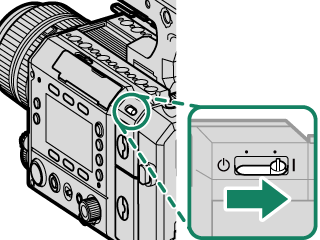
Slide the ON/OFF switch to the b side to turn on the camera. Slide the ON/OFF switch to the a side to turn off the camera.
This website uses cookies. By using the site you are agreeing to our Privacy Policy.
Enter a search term and click
.
Slide the ON/OFF switch to the b side to turn on the camera. Slide the ON/OFF switch to the a side to turn off the camera.


Table of Contents
Introduction
Before You Begin
First Steps
Basic Shooting and Playback
Shooting Settings
Playback and the Playback Menu
Network Connection
The Menus
Shortcuts
Peripherals and Optional Accessories
Technical Notes
