
 .
.Charging the Supplied Battery
Charge the supplied battery.
Charging the Supplied Battery
Using the supplied battery allows you to record using the camera’s basic functions. You can also replace the V-mount battery without turning off the camera.
For safety reasons, the supplied battery is not charged at the time of purchase. The camera will not function if the supplied battery is not charged; be sure to charge the supplied battery before use.
Charging takes about 180 minutes.
Turning on the camera while it is charging may result in a longer charging time than charging when the power is off.
-
Open the battery-chamber cover.
Lift the battery-chamber latch (A), rotate the latch as shown (B), and open the battery-chamber cover (C).
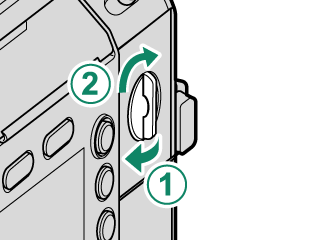
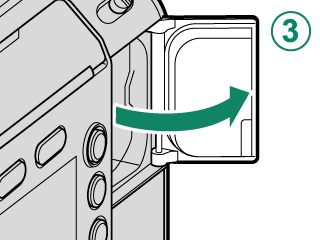
Do not open the battery-chamber cover when the camera is on. Failure to observe this precaution could damage files or memory cards.
Do not use excessive force when handling the battery-chamber cover.
-
Insert the supplied battery as shown.
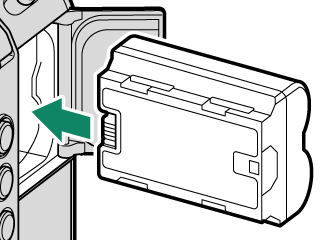
Inserting the supplied battery in the wrong orientation may damage the camera. Insert it in the correct orientation.
Confirm that the supplied battery is securely latched.
-
Close the battery-chamber cover.
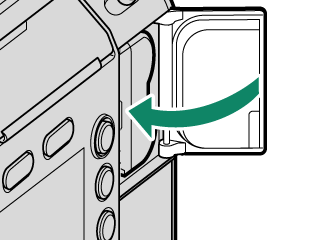
If the cover does not close, check that the supplied battery is in the correct orientation. Do not attempt to force the cover shut.
-
Rotate the battery-chamber latch as shown (A), and tilt the latch down (B).
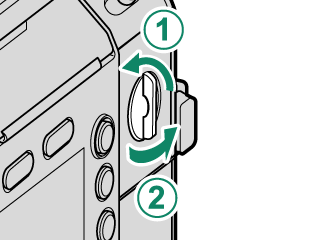
-
Connect the supplied AC power adapter to charge the supplied battery (aUsing the AC Power Adapter).
W235 Battery Mode
The camera will operate in W235 battery mode when it is turned on while it is powered only by the supplied battery.
The following restrictions apply in W235 battery mode:
- The 12-pin connector for lens connection, SDI OUT connector, HDMI OUT connector, and DC OUT 12 V connector cannot be used.
- An external SSD cannot be used.
- Wireless LAN connection, wired LAN connection, and Bluetooth connection are not available.
- 8K image quality cannot be selected for [RESOLUTION].
Attaching the AC power adapter or V-mount battery will exit W235 battery mode.
Removing the Supplied Battery
Before removing the supplied battery, turn the camera off and open the battery-chamber cover.
To remove the supplied battery, press the battery latch to the side with your finger to release the lock (A), and remove the supplied battery (B).
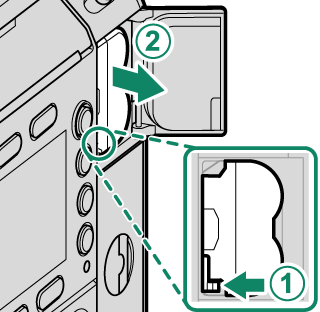
The supplied battery may become hot after using the camera. Observe caution when removing the supplied battery.
Charge Status
When the camera is turned off, the indicator lamp shows the charge status of the supplied battery.
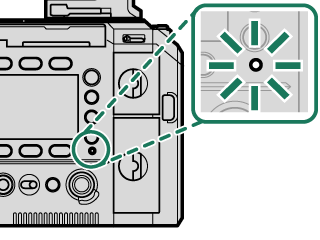
| Indicator lamp | Battery status |
|---|---|
| Glows green | Battery charging |
| Off | Charging complete |
| Blinks green | Battery fault |
When the camera is turned on, the icon on the screen shows the charge status of the supplied battery.
| Icon | Battery status |
|---|---|
| y | Battery charging |
| e | Charging complete |
| z | Battery fault |
Do not affix labels or other objects to the supplied battery. Failure to observe this precaution could make it impossible to remove the battery from the camera.
Do not short the supplied battery terminals. This may cause overheating and pose a safety hazard.
Read the cautions for the supplied battery in “aFor Your Safety”.
Use only genuine Fujifilm rechargeable batteries designated for use in this camera. Failure to observe this precaution could result in product malfunction.
Do not remove the labels from the battery or attempt to split or peel the outer casing.
The supplied battery gradually loses its charge when not in use. Charge the supplied battery one or two days before use.
If the supplied battery fails to hold a charge, it has reached the end of its charging life and must be replaced. Purchase a new battery.
Unplug the AC power adapter from the power outlet when it is not in use.
If the supplied battery is left for long periods without charging, you may find that its quality degrades or that it no longer holds a charge. Charge the supplied battery regularly.
Remove dirt from the supplied battery terminals with a clean, dry cloth. Failure to observe this precaution could prevent the supplied battery from charging.
Note that charging times increase at low or high temperatures.


